Mobile robotics in simulation with ROS 2 - Part 3: Safety
Introduction
Part 2 ended with the robot reading markers in real time and knowing where they are. Before it is sent anywhere, it has to avoid running into what gets in its way. This part introduces a 2D lidar and a brake.
The subject is:
- What the lidar sees.
- Who holds the power over the wheels.
- How much room the robot needs to stop, and how that becomes the brake's zones.
The question behind this part is: how far ahead does the robot need to see something to stop before touching it, whatever its speed?
The chosen architecture
The driver publishes the speed it wants on /cmd_vel_teleop. The scan_guard node takes it in along with every lidar sweep and decides what reaches /cmd_vel, the topic that runs the wheels: it lets the speed through, caps it, or stops it. The brake's zones are drawn in RViz.
The sensor
A 2D lidar spins and measures the distance to what surrounds it, in a single plane. The robot's lidar gives 500 rays per turn and 10 turns per second.
It sits on a mast 30 cm above the floor, above everything else on the robot, where nothing blocks its view.
Decision 1: who holds the power over the wheels?
| Option | How it works | What it means |
|---|---|---|
| A separate node that publishes zero when something is close | the driver and the brake publish on the same topic | the wheels obey whichever message arrives last: between two of the brake's zeros, a command from the driver gets through |
A multiplexer with priorities (twist_mux) | the brake publishes a lock that stops every lower-priority source | it can stop the robot, but it cannot cap its speed |
The brake is the only one publishing on /cmd_vel | the driver publishes on another topic and the brake decides what goes through | nothing reaches the wheels without going through it |
With the brake as the only one publishing on /cmd_vel, moving the robot means going through the brake. And since it receives the whole command, it can also cap the speed, which is what Decision 2 uses.
The brake also publishes all the time, 20 times a second, even when the command is zero. That way, if commands stop reaching the base, it is clear something failed, and another automatic brake could be added to it. The standard ROS 2 controller for differential bases (diff_drive_controller) does that: half a second without a new command and it stops.
Decision 2: how far ahead should the brake look?
The brake watches a corridor as wide as the robot plus 5 cm on each side, in the direction it drives (backwards too, when reversing). The corridor holds two zones. When something enters the stop zone, the robot stops. While something is in the slow zone, the robot goes no faster than 0.15 m/s.
The length of the stop zone comes from physics. Three things happen between something appearing and the robot standing still, and this is how far it goes during each one at 0.6 m/s, its top speed for now:
| What happens | Time or limit | Distance covered |
|---|---|---|
| The lidar sweeps that direction again | up to 0.1 s | 6 cm |
| The brake sends the zero | up to 0.05 s | 3 cm |
| The base brakes | 1 m/s² at most | 18 cm |
| Total | about 27 cm |
To check it, an experiment makes a box appear in front of the moving robot, at several distances, and measures with Gazebo's true pose how far the robot goes before it stands still. That was 160 appearances at four speeds:
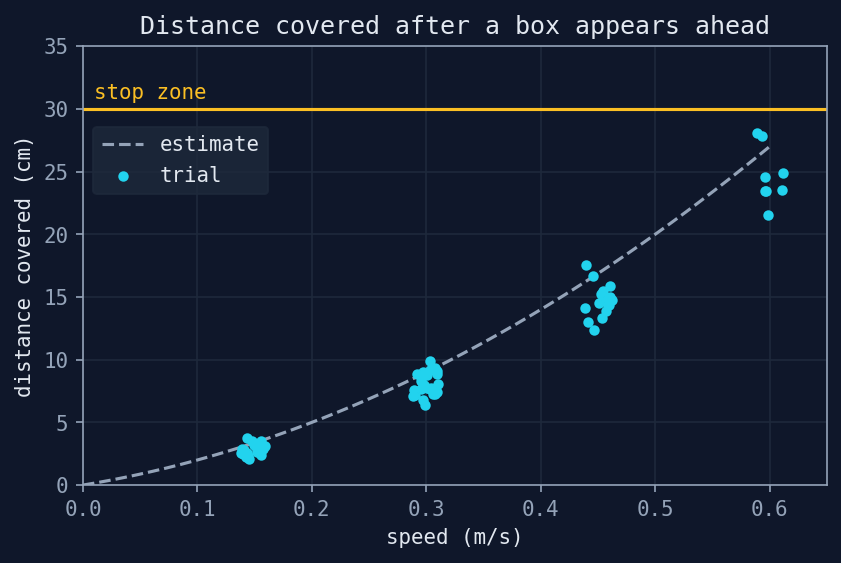
For the boxes that appeared inside the stop zone and were not touched, the robot covered:
| Speed | Until it stood still (median) | Most |
|---|---|---|
| 0.15 m/s | 2.8 cm | 3.8 cm |
| 0.30 m/s | 7.9 cm | 9.9 cm |
| 0.45 m/s | 14.7 cm | 17.6 cm |
| 0.60 m/s | 24.1 cm | 28.0 cm |
- Nothing that appeared 25 cm away or more was ever touched, at any speed.
- The worst case measured, 28 cm at 0.6 m/s, is 2 cm under the stop zone's 30 cm.
- The brake's median reaction was 0.1 s.
| Stop zone | What it means |
|---|---|
| What it takes to brake from the slow speed (about 3 cm) | enough if everything is seen from far away, but something that appears close at full speed gets hit |
| 30 cm: what it takes to stop from the top speed, with a margin | anything that appears 30 cm away or more is never touched, even at the top speed |
| Longer (50 cm or more) | more margin, at the cost of the robot never getting within half a metre of anything |
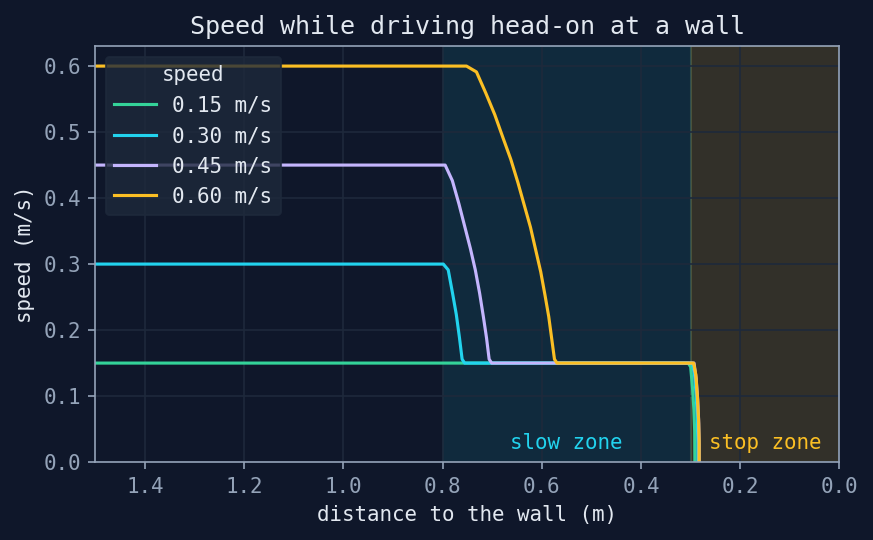
The slow zone starts at 80 cm, for what can be seen coming from a distance:
- From the top speed, getting down to 0.15 m/s takes 26 cm, 9 of reaction and 17 of braking.
- That fits in the 50 cm between the two zones, and the robot reaches the stop zone already at the slow speed.
The plot shows a head-on approach to a wall at each of the four speeds:
Decision 3: what does the brake do when it cannot tell?
There are two moments when the brake has no way of knowing whether the path is clear, and in both it sends zero:
- At start-up, until it has a sweep and knows where the lidar sits on the robot.
- When half a second goes by without a new sweep, as when the simulation pauses or the lidar comes unplugged. It also drops the command then, and the robot will wait.
After a stop, the robot goes on with its command as long as nothing is detected in its way. The brake keeps the command and hands it back once the path has been clear:
- for a second, which gives whoever crossed its path time to move off,
- up to 5 cm past the stop zone, to keep lidar noise at the edge from letting the robot go.
In the experiment, when the box was taken away with the command still held, the robot went on after a median of 1.06 s, and 1.17 s at most.
The result
This is how the brake sees the room from above, at two moments: with the box inside the slow zone and with a post inside the stop zone. The dots are a real lidar sweep, and the arrow is the room left to the nearest thing in the corridor, in the colour of the zone the brake itself reports:
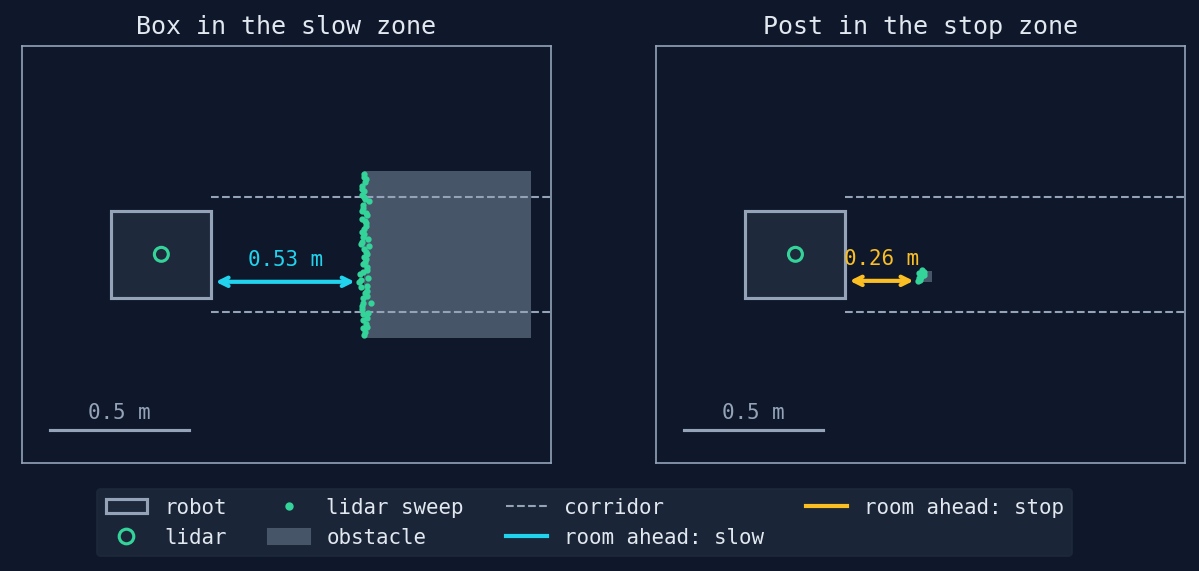
The approach experiment drives the robot, through the brake, at what is in the room:
- The wall, at six angles.
- A 4 cm post, at four sideways offsets.
- The box, face-on and corner-on.
Each case is repeated three times at each of the four speeds, 144 approaches in all.
| Driving at | Room left at rest (median) |
|---|---|
| The wall, head-on | 29 cm |
| The wall, at 15° | 28 cm |
| The wall, at 30° | 26 cm |
| The wall, at 45° | 23 cm |
| The wall, at 60° | 18 cm |
| The wall, at 75° | 12 cm |
| A 4 cm post in the way | 28 cm |
| The box, face-on | 29 cm |
| The box, corner-on | 24 cm |
| A post outside the corridor | passed 6 cm away (83% of the time) |
In all 144 approaches the robot never touched anything:
- Head-on, it stopped about 28 cm away at all four speeds, because it always stopped from the slow speed.
- At an angle it ends up closer: the brake measures the room in the direction the robot drives, and the robot's corner reaches the wall first.
- The post outside the corridor hardly ever stops the robot, which drives past it 6 cm away.
Limitations
- There is only one plane. Anything lower (a low box) or higher (a tabletop) does not exist for the lidar.
- Turning in place is not watched. The brake looks where the robot drives. While turning, a corner of the robot can reach something beside it.
- Braking is the simulation's. The base brakes at 1 m/s² because that is the limit it was given. A heavier robot or a slippery floor brakes worse, and the stop zone would vary more.
- A lidar in an ideal space. No glass, black surfaces or reflections, and "predictable" noise.
- Something right at the edge of the corridor can stop the robot. Lidar noise sometimes puts points inside the corridor, and with the one-second wait the robot takes a while to go on. It happened in 17% of the passes by the post.
Wrapping up
The robot now has a brake of its own, and it is the only node that can talk to the wheels. Anything that appears 30 cm away or more is never touched, whatever the robot's speed, at least in simulation.
Coming up in Part 4
Spatial awareness: with a marker in view, the robot works out where it is in the room and how far that position can be trusted.
The full code can be found at github.com/KevDP/ros2-aruco-world. To regenerate this part's numbers:
experiments/sim.sh guard:=true -- python3 experiments/guard_view.py
experiments/sim.sh guard:=true -- python3 experiments/stopping.py
python3 experiments/stopping_report.py